---
title: Understanding your team's Behaviour strengths and areas for growth
description: Team profiles
---
[Skip to content](https://knowledge.thomas.co/assess-connect/how-to-understand-the-strengths-and-areas-of-growth-for-your-team#main-content)
English
Show submenu for translations
[Raise a Ticket](https://knowledge.thomas.co/assess-connect/kb-tickets/new?hsLang=en)
[](https://knowledge.thomas.co/?hsLang=en)
- [Training](https://www.thomas.co/uk/solutions/training-accreditation)
- [Professional Services](https://www.thomas.co/uk/professional-services)
- [Integrations](https://www.thomas.co/uk/platform/integrations)
- [Digital Badging](https://www.thomas.co/digital-badging)
Open main navigation
Close main navigation
- [Training](https://www.thomas.co/uk/solutions/training-accreditation)
- [Professional Services](https://www.thomas.co/uk/professional-services)
- [Integrations](https://www.thomas.co/uk/platform/integrations)
- [Digital Badging](https://www.thomas.co/digital-badging)
- English
Show submenu for translations
- [Raise a Ticket](https://knowledge.thomas.co/assess-connect/kb-tickets/new)
- [Go to thomas.co](https://www.thomas.co/)
[Go to thomas.co](https://www.thomas.co/)
Search the Knowledge base
- There are no suggestions because the search field is empty.
1. [Assess & Connect](https://knowledge.thomas.co/assess-connect?hsLang=en)
2. [Manager Experience](https://knowledge.thomas.co/assess-connect/manager-experience?hsLang=en)
# Understanding your team's Behaviour strengths and areas for growth
## Within our platform, the teams feature combines individual Behaviour insights with an overall team profile, which gives a clear picture of how everyone works together. This insightful approach helps you identify your team’s strengths and areas for growth and suggests ways to improve collaboration.
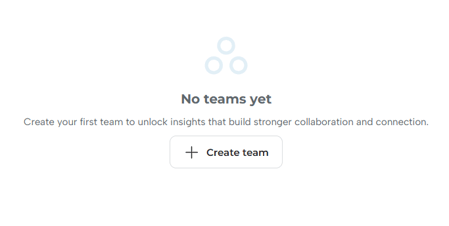
**Creating a team profile**
Click the 'Create team' button to create your team. Choose a team name and select colleagues to join your team. To learn more about selecting between private and shared teams, read here.
**Viewing a Team Behaviour profile**
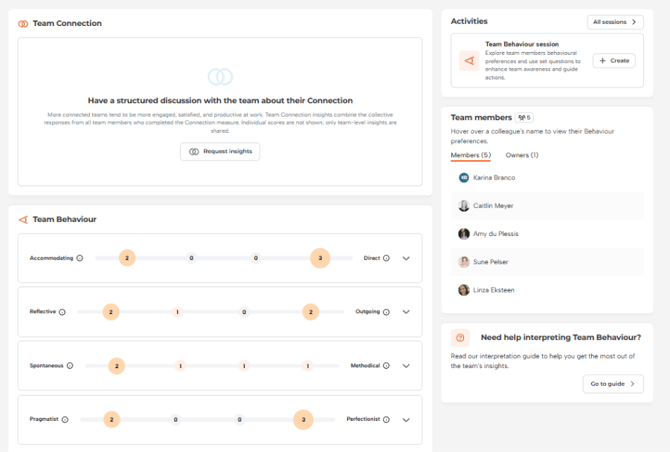
When viewing your team's Behaviour profile, you can explore your combined team profile and discover your team's strengths and gaps.
1\. Click on the drop-down arrow icons to find out more about the team's behavioural preferences.
2\. Selecting a specific team member's name on the right will highlight their individual results on the team graph if they have set their Behaviour insights as public. If they are set to private, their results will be included in the team profile but will not be directly highlighted.
**Running a Team Behaviour session**
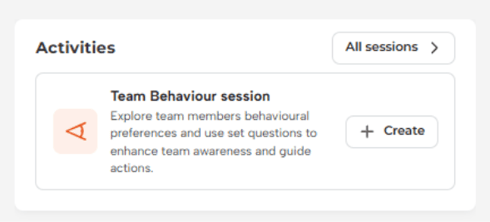
We have created an easy way to harness team Behaviour insights and run a team session. Whether you are a manager, leader, or individual contributor, you can run a Team Behaviour session if you are the team owner. In the right-hand corner of a team's page is an ‘Activities’ section. By clicking on 'Create', the system guides you through the process.
**Creating a session**
Once you click the 'Create' button, you will be asked to provide a name, goal and duration for the session.

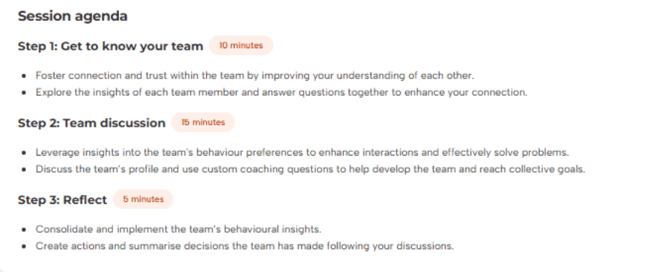
**Getting ready to have a great session.** We advise you to preview the session and carefully read the instructions before starting your session.
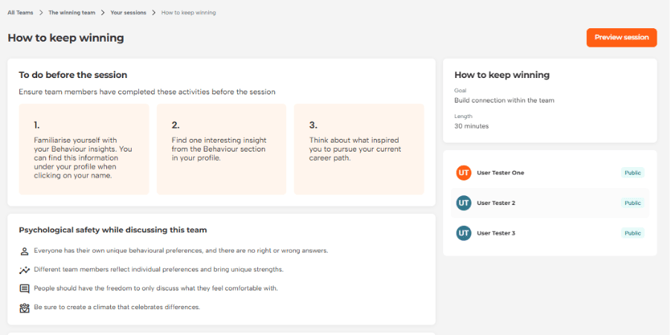
**Preview your agenda.** Make sure you feel comfortable with each step to ensure a successful session.
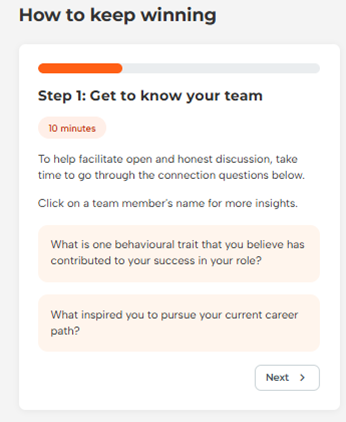
**Step 1. Get to know your team**
You can use the guiding questions on the left to help you through this step.
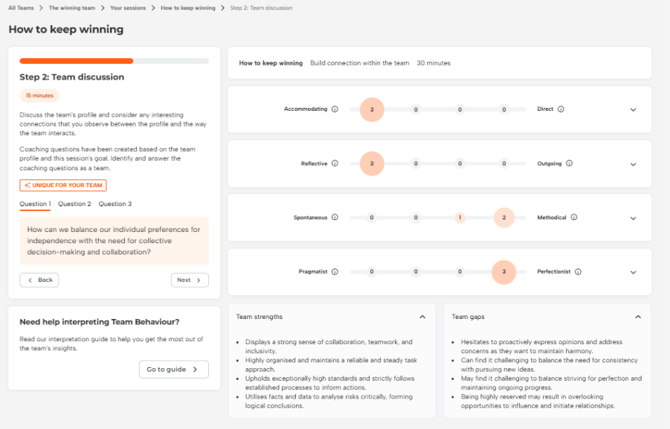
**Step 2. Team discussion**
Note how the team's behavioural preferences are identified and what their strengths and gaps are. Use the three questions on the left to facilitate shared understanding and goal setting to improve team collaboration and connection.
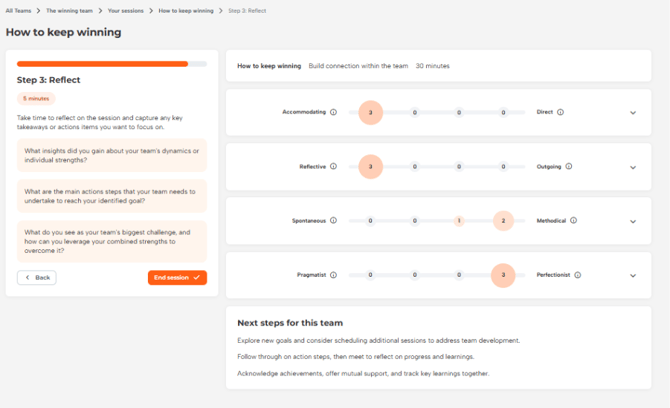
**Step 3. Reflect**
Reflect on the session together and establish the next steps for the team.
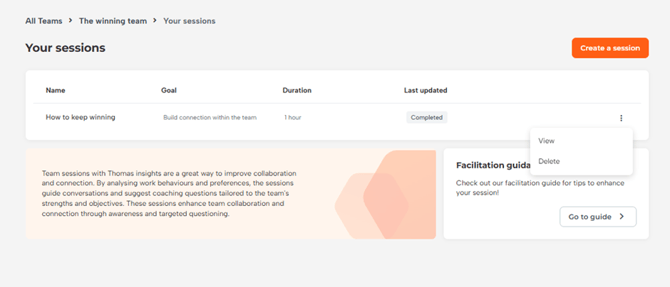
**Finding previous sessions**
If you have created a session for this team before, you will be able to access it here.
**To learn more about Teams and running your own Team session, follow the link below.**
**[Team profile interpretation guide](https://knowledge.thomas.co/assess-connect/how-to-interpret-a-team-profile?hsLang=en).**
- [Employee Experience](https://knowledge.thomas.co/assess-connect/employee-experience?hsLang=en)
- [Expert Insight](https://knowledge.thomas.co/assess-connect/expert-insight?hsLang=en)
- [HR Experience](https://knowledge.thomas.co/assess-connect/hr-experience?hsLang=en)
- [Manager Experience](https://knowledge.thomas.co/assess-connect/manager-experience?hsLang=en)
- [Settings](https://knowledge.thomas.co/assess-connect/settings?hsLang=en)
- [Thom AI](https://knowledge.thomas.co/assess-connect/thom-ai?hsLang=en)
- [Training](https://www.thomas.co/uk/solutions/training-accreditation)
- [Professional Services](https://www.thomas.co/uk/professional-services)
- [Integrations](https://www.thomas.co/uk/platform/integrations)
- [Digital Badging](https://www.thomas.co/digital-badging)
[](https://thomas.co)
[mailto:email@email.com](mailto:email@email.com)
Copyright © 2025, Thomas