---
title: Setting up teams and measuring Connection
description: Setting up teams and requesting connection, Connect, English
---
[Skip to content](https://knowledge.thomas.co/assess-connect/setting-up-teams-and-measuring-connection#main-content)
English
Show submenu for translations
[Raise a Ticket](https://knowledge.thomas.co/assess-connect/kb-tickets/new?hsLang=en)
[](https://knowledge.thomas.co/?hsLang=en)
- [Training](https://www.thomas.co/uk/solutions/training-accreditation)
- [Professional Services](https://www.thomas.co/uk/professional-services)
- [Integrations](https://www.thomas.co/uk/platform/integrations)
- [Digital Badging](https://www.thomas.co/digital-badging)
Open main navigation
Close main navigation
- [Training](https://www.thomas.co/uk/solutions/training-accreditation)
- [Professional Services](https://www.thomas.co/uk/professional-services)
- [Integrations](https://www.thomas.co/uk/platform/integrations)
- [Digital Badging](https://www.thomas.co/digital-badging)
- English
Show submenu for translations
- [Raise a Ticket](https://knowledge.thomas.co/assess-connect/kb-tickets/new)
- [Go to thomas.co](https://www.thomas.co/)
[Go to thomas.co](https://www.thomas.co/)
Search the Knowledge base
- There are no suggestions because the search field is empty.
1. [Assess & Connect](https://knowledge.thomas.co/assess-connect?hsLang=en)
2. [Manager Experience](https://knowledge.thomas.co/assess-connect/manager-experience?hsLang=en)
# Setting up teams and measuring Connection
## To understand how connected your team feels, ask them to complete the Connection measure. This enables you to access team-level Connection insights.
This article outlines the simple process of measuring Connection at a team level, so that you can gather meaningful insights about your team’s dynamics. By requesting these insights, you enable opportunities for reflection and improvement, helping your team build stronger relationships and work more effectively together.
#### **Make sure all team members are added as colleagues**
1. Log in to our platform.
2. Navigate to the “Connect’’ tab and select “Colleagues”.
3. If you are an admin of your account, select ‘Invite colleagues’ and input the email addresses of those you wish to add to your team. If you are a viewer, you may need to reach out to an admin in your organisation to invite colleagues.
4. The colleagues will then receive an email invitation and will have to create their own profile.
#### **Create your team**
1. Navigate to the “Connect” section of our platform and select “Teams”. Before you can create teams, ensure you have completed Behaviour and shared your insights.
2. Select ‘Create a team’. You need at least 2 people on your team to request their Connection insights. Teams can consist of 2 to 50 colleagues.
3. You will immediately see a summary of the team’s behavioural profile for all team members who have already completed their Behaviour assessment. This is not tied to Connection insights; however, it has its own unique function. Read more about Team Behaviour [here](https://knowledge.thomas.co/assess-connect/how-to-interpret-a-team-profile?hsLang=en).
4. You can request the team to complete the Connection measure to see the overall Team Connection insights. Select ‘Request insights’ under ‘Team Connection’ and choose a completion date.
If you are an admin or owner, you also have the option of keeping your team private or sharing it with the relevant team members. Sharing it will merely enable all team members to view the combined team behavioural profile. Read more about this **here**.
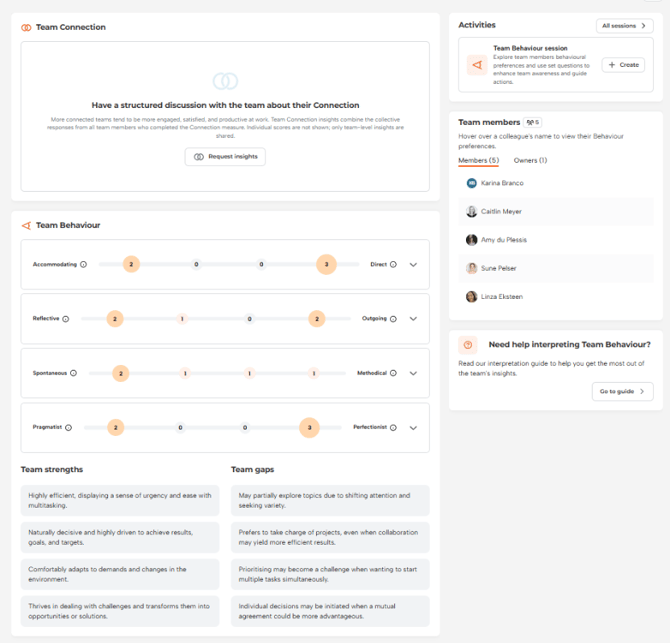
The team members will now receive an email invitation to complete the Connection. They have until the completion date to do so, after which no responses will be accepted.
Once completed, each team member will be able to view their own sense of connection towards their team. However, the combined view of all team members’ results will only be accessible to the team creator after at least 3 individuals have completed the Connection measure.
#### **Facilitating a discussion about a team’s Connection**
1. Navigate to the team you created and select **‘**View details’ in the Team Connection section to expand their insights.
2. Review the ‘Overall Connection’ score for a snapshot of how connected the team currently feels. Then focus on the dimensions with the highest scores, as they may be strong indicators of your team’s strengths.
3. Explore the colour indicators by dimension:
1. 1. Green: High connection
2. Yellow: Moderate connection
3. Orange: Low connection
You can view a team’s Connection over time by looking at the Team Connection history in the right-hand corner when viewing a team’s Connection details. This view helps you track changes over time and view each request, including overall results, completion rates, and due dates.
Use this information to facilitate a [team discussion](https://knowledge.thomas.co/assess-connect/turning-connection-insights-into-team-conversations?hsLang=en). Summarise it in a way that helps you understand and communicate key takeaways.
*Discussions about team connection matter because they create space for reflection, where strengths can be explored, challenges surfaced, and everyone has a voice in shaping a supportive environment. These conversations foster trust and inclusivity while driving actionable steps to improve collaboration. Ultimately, they strengthen team cohesion and effectiveness.*
- [Employee Experience](https://knowledge.thomas.co/assess-connect/employee-experience?hsLang=en)
- [Expert Insight](https://knowledge.thomas.co/assess-connect/expert-insight?hsLang=en)
- [HR Experience](https://knowledge.thomas.co/assess-connect/hr-experience?hsLang=en)
- [Manager Experience](https://knowledge.thomas.co/assess-connect/manager-experience?hsLang=en)
- [Settings](https://knowledge.thomas.co/assess-connect/settings?hsLang=en)
- [Thom AI](https://knowledge.thomas.co/assess-connect/thom-ai?hsLang=en)
- [Training](https://www.thomas.co/uk/solutions/training-accreditation)
- [Professional Services](https://www.thomas.co/uk/professional-services)
- [Integrations](https://www.thomas.co/uk/platform/integrations)
- [Digital Badging](https://www.thomas.co/digital-badging)
[](https://thomas.co)
[mailto:email@email.com](mailto:email@email.com)
Copyright © 2025, Thomas