---
title: Completing the Connection measure and sharing my results
description: How to complete the connecrtion measure and share your results with colleagues
---
[Skip to content](https://knowledge.thomas.co/assess-connect/using-the-connection-measure#main-content)
English
Show submenu for translations
[Raise a Ticket](https://knowledge.thomas.co/assess-connect/kb-tickets/new?hsLang=en)
[](https://knowledge.thomas.co/?hsLang=en)
- [Training](https://www.thomas.co/uk/solutions/training-accreditation)
- [Professional Services](https://www.thomas.co/uk/professional-services)
- [Integrations](https://www.thomas.co/uk/platform/integrations)
- [Digital Badging](https://www.thomas.co/digital-badging)
Open main navigation
Close main navigation
- [Training](https://www.thomas.co/uk/solutions/training-accreditation)
- [Professional Services](https://www.thomas.co/uk/professional-services)
- [Integrations](https://www.thomas.co/uk/platform/integrations)
- [Digital Badging](https://www.thomas.co/digital-badging)
- English
Show submenu for translations
- [Raise a Ticket](https://knowledge.thomas.co/assess-connect/kb-tickets/new)
- [Go to thomas.co](https://www.thomas.co/)
[Go to thomas.co](https://www.thomas.co/)
Search the Knowledge base
- There are no suggestions because the search field is empty.
1. [Assess & Connect](https://knowledge.thomas.co/assess-connect?hsLang=en)
2. [Employee Experience](https://knowledge.thomas.co/assess-connect/employee-experience?hsLang=en)
# Completing the Connection measure and sharing my results
## To complete the Connection measure for your personal insights and to gain a deeper understanding of your relationship with a particular group, follow these steps:
Note: If you want to initiate measuring Connection with a specific group for personal learning or to share with select individuals, follow these steps. Alternatively, your manager may invite you to complete this measure for team or individual interventions and share your insights with them.
### Step 1
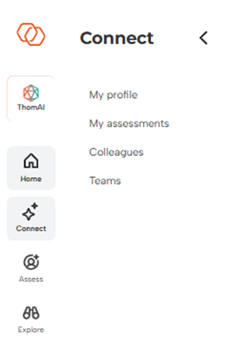
In the panel on the left, click on ''My profile''**.**
****
### **Step 2**
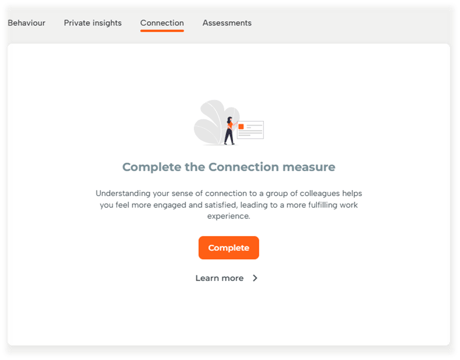
Select the tab labelled 'Connection'
### Step 3
Click on 'Complete' to begin taking the measure
### Step 4
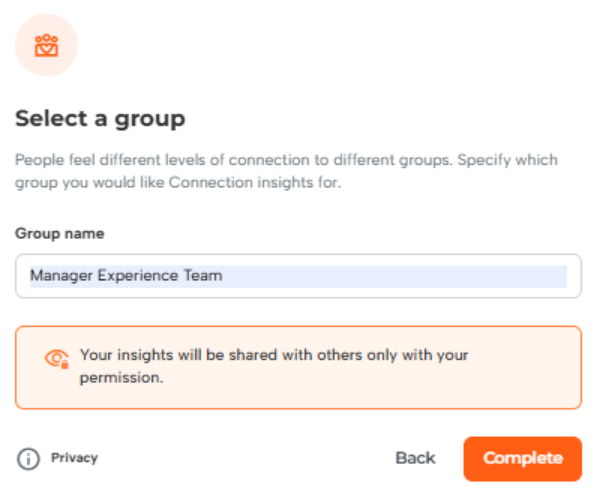
Enter the name of the group you are completing the measure for, and then click 'Complete'
### Step 5
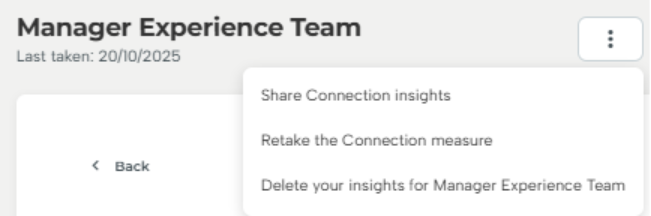
Once you have completed the measure, you can share your results by clicking on the three dots and selecting 'Share Connection insights'
****
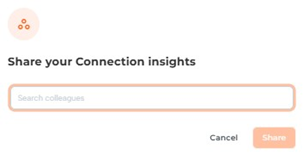
### Step 6
Simply search for your colleague's name and click 'Share'
- [Employee Experience](https://knowledge.thomas.co/assess-connect/employee-experience?hsLang=en)
- [Expert Insight](https://knowledge.thomas.co/assess-connect/expert-insight?hsLang=en)
- [HR Experience](https://knowledge.thomas.co/assess-connect/hr-experience?hsLang=en)
- [Manager Experience](https://knowledge.thomas.co/assess-connect/manager-experience?hsLang=en)
- [Settings](https://knowledge.thomas.co/assess-connect/settings?hsLang=en)
- [Thom AI](https://knowledge.thomas.co/assess-connect/thom-ai?hsLang=en)
- [Training](https://www.thomas.co/uk/solutions/training-accreditation)
- [Professional Services](https://www.thomas.co/uk/professional-services)
- [Integrations](https://www.thomas.co/uk/platform/integrations)
- [Digital Badging](https://www.thomas.co/digital-badging)
[](https://thomas.co)
[mailto:email@email.com](mailto:email@email.com)
Copyright © 2025, Thomas