---
title: How do you compare candidates in Thomas Assess?
description: Understand how to use ratings to easily compare candidates with your ideal role profile.
---
[Skip to content](https://knowledge.thomas.co/how-do-you-compare-candidates-in-assess#main-content)
English
Show submenu for translations
[Raise a Ticket](https://knowledge.thomas.co/kb-tickets/new?hsLang=en) [Sign in](https://knowledge.thomas.co/_hcms/mem/login?redirect_url=https%3A%2F%2Fknowledge.thomas.co%2Fhow-do-you-compare-candidates-in-assess&hsLang=en)
[](https://knowledge.thomas.co/?hsLang=en)
- [Training](https://www.thomas.co/solutions/training-accreditation)
Show submenu for Training
- [Digital badging](https://www.thomas.co/digital-badging)
- [Professional Services](https://www.thomas.co/professional-services)
- [Integrations](https://www.thomas.co/platform/integrations)
Open main navigation
Close main navigation
- [Training](https://www.thomas.co/solutions/training-accreditation)
Show submenu for Training
- [Digital badging](https://www.thomas.co/digital-badging)
- [Professional Services](https://www.thomas.co/professional-services)
- [Integrations](https://www.thomas.co/platform/integrations)
- English
Show submenu for translations
- [Raise a Ticket](https://knowledge.thomas.co/kb-tickets/new)
- [Sign in](https://knowledge.thomas.co/_hcms/mem/login?redirect_url=https%3A%2F%2Fknowledge.thomas.co%2Fhow-do-you-compare-candidates-in-assess)
- [Go to thomas.co](https://www.thomas.co/)
[Go to thomas.co](https://www.thomas.co/)
Search the Knowledge Base
- There are no suggestions because the search field is empty.
1. [Thomas Knowledge Base](https://knowledge.thomas.co/?hsLang=en)
2. [Thomas Assess](https://knowledge.thomas.co/thomas-assess?hsLang=en)
- [Thomas Connect](https://knowledge.thomas.co/thomas-connect?hsLang=en)
- [Thom AI Coach](https://knowledge.thomas.co/thom-ai-coach?hsLang=en)
- [Thomas Assess](https://knowledge.thomas.co/thomas-assess?hsLang=en#main-content)
- [FAQs](https://knowledge.thomas.co/thomas-assess?hsLang=en#faqs)
- [Assessments](https://knowledge.thomas.co/thomas-assess?hsLang=en#assessments)
- [Thomas Assess Accredited](https://knowledge.thomas.co/thomas-assess-accredited?hsLang=en#main-content)
- [FAQs](https://knowledge.thomas.co/thomas-assess-accredited?hsLang=en#faqs)
- [Assessments](https://knowledge.thomas.co/thomas-assess-accredited?hsLang=en#assessments)
- [People Science](https://knowledge.thomas.co/people-science?hsLang=en)
- [Integrations](https://knowledge.thomas.co/integrations?hsLang=en)
- [Additional Services](https://knowledge.thomas.co/additional-services?hsLang=en#main-content)
- [Global Learning](https://knowledge.thomas.co/additional-services?hsLang=en#global-learning)
- [Professional Services](https://knowledge.thomas.co/additional-services?hsLang=en#professional-services)
# How do you compare candidates in Thomas Assess?
## Understand how to use ratings to easily compare candidates within a job role.
**Understanding the ratings **
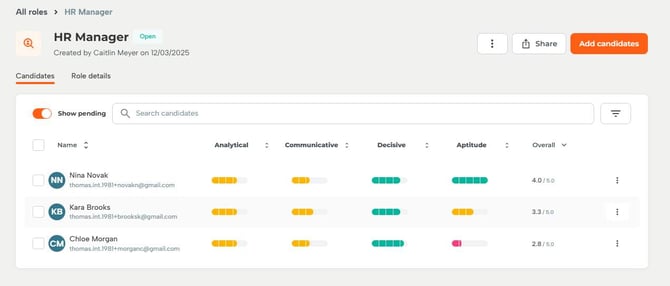
Candidate ratings are used to compare candidates to each other and see potential fit within a specific job role.
They are based on the results of the assessments they have completed and the learning environment and characteristics criteria that were defined when the role was created.
There are three bandings for the characteristics:
- Low (0.5-1.5) - Red
- Moderate (2-3.5) - Amber
- High (4+) – Green
When reviewing the ratings, take into consideration
- other factors such as candidate experience, interview results, and assessment centres
- that the rating is a guide, not a decision-making tool to use in isolation
- that there may be other areas that can be explored further in a follow-up interview
Overall ratings are only shown if all selected assessments are completed to compare candidates accurately and fairly. Candidates are then ranked in priority order in terms of best fit for the specific job role. It is important to note that candidates with low ratings for one job role may have high ratings for another.
**How the ratings are calculated**
In order for Characteristic candidate ratings to be calculated, both Behaviour and Personality assessment results are required. Therefore, when a user invites a candidate directly from a role, the Behaviour and Personality assessments are automatically grouped, which ensures both assessments are completed.
If an existing candidate is added to the role (e.g., a candidate invited from the Profiles page), additional assessments can easily be requested. The invitation journey from the Profiles page will still allow all assessments to be sent separately.
The overall score is calculated out of 5 for each assessment. For the assessments to remain weighted evenly, Behaviour and Personality will each contribute to 50% of the scoring when Aptitude has not been taken. When Aptitude scores are available, each assessment is weighted at 33%.
**Characteristics report**
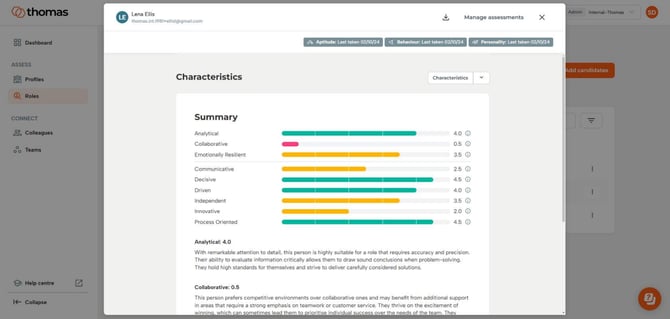
The characteristics summary is **only** available when viewing a candidate from within a job role and not when viewing a candidate within the Profiles section.
The summary provides a complete picture of the characteristic profile of a candidate and includes additional information to help with decision-making. It is conveniently available to download as a PDF.
You can learn more about role profiling [here](https://www.thomas.co/role-profiling ).
- [Training](https://www.thomas.co/solutions/training-accreditation)
- [Digital badging](https://www.thomas.co/digital-badging)
- [Professional Services](https://www.thomas.co/professional-services)
- [Integrations](https://www.thomas.co/platform/integrations)
[](https://thomas.co)
[mailto:email@email.com](mailto:email@email.com)
Copyright © 2025, Thomas
