Skip to content
English
  • There are no suggestions because the search field is empty.

Creating a job role in Assess

Create job roles with ease and simplicity. Using our scientific framework to help you identify ideal candidates

Step 1: Log in to Thomas Assess

From your dashboard, navigate to 'Roles' by selecting it from the menu on the left-hand side.

Step 2: Add a role

From the Roles page, click on 'Add role' to begin the role creation process


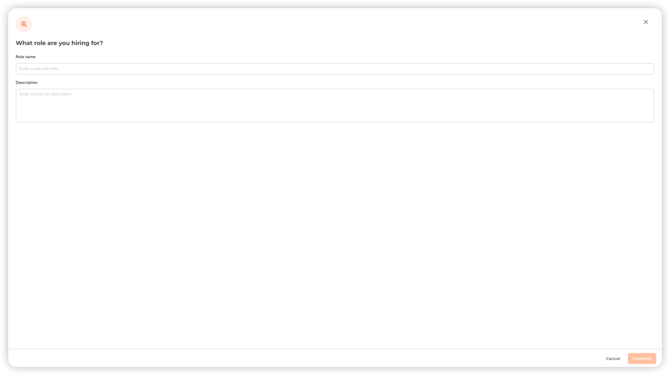
Step 3: Define your role 

Add the name of the job role and a summary description, or add the full job description for your reference.

A white rectangular object with black border

Description automatically generated, Picture

Step 4: Identify the learning environment for this role

Define the learning environment associated with this role by considering:

  • The level of the role 
  • How quickly a person will need to adapt to a new role and learn new information 
  • The amount of experience required 
  • Whether the role includes routine tasks or whether it will be constantly changing
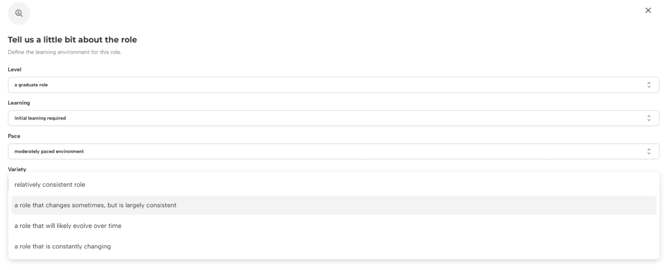
It is important to note that the questions help define the learning environment associated with the role. Each set of options represents different requirements and is not necessarily ranked on a scale from less important to more important for the role.

Picture 1, Picture


Step 5: Identify the required characteristics for this role

Select the 3 characteristics that are most important for your role.

When considering which characteristics to choose, think about which are necessary for an individual to possess 80% of the time to be successful in the role. 

By only selecting 3 characteristics, Assess is able to weight specific factors of the Behaviour and Personality assessment results against the job requirements to provide you with a fit-for-the-role rating. 
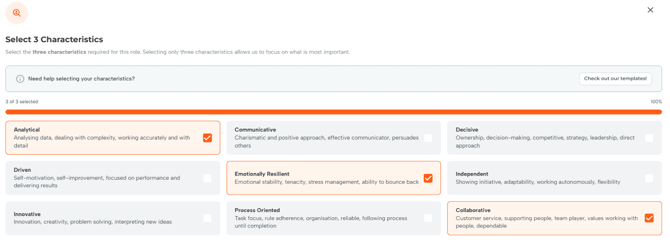
Characteristics descriptions: 

Analytical: Analysing data, dealing with complexity, working accurately and with detail .              Enjoys applying their curiosity to complex problems through an analytical approach. They work accurately and with detail, wanting to reach clear answers to complex problems. 

Communicative: Charismatic and positive approach, effective communicator, persuade others. They want to work with others, using effective communication to reach decisions and manage others. 

Decisive: Ownership, decision making, competitive, strategy and leadership, direct approach. They are competitive, will want to take charge of situations and decisions, and want to have ownership of delivering long-term projects.

Driven: Self-motivation, industrious, focused on performance and continuous improvement. They set stretch goals for themselves, wanting to improve and deliver increasingly impressive outcomes.

Emotionally resilient: Emotional stability, tenacity, stress management, ability to bounce back. They continue to persevere even under pressure and are able to bounce back quickly after stress.

Independent: Showing initiative, adaptability, working autonomously, flexibility.                             They want the authority to take initiative and be flexible in how they approach work.

Innovative: Innovation, creativity, problem-solving, interpretation.                                                  They want to use their problem-solving capabilities to provide insight and interpretation to their work.

Process Oriented: Task focus, rule adherence, technical orientation, reliable, following process until completion. They are reliable workers, using established processes and rules to deliver technical and high-quality work.

Collaborative: Customer service, supporting people, team player, values working with people, dependable. A dependable worker who focuses on supporting others and providing high-quality services to customers (both internal and external).

Step 4: Add the role

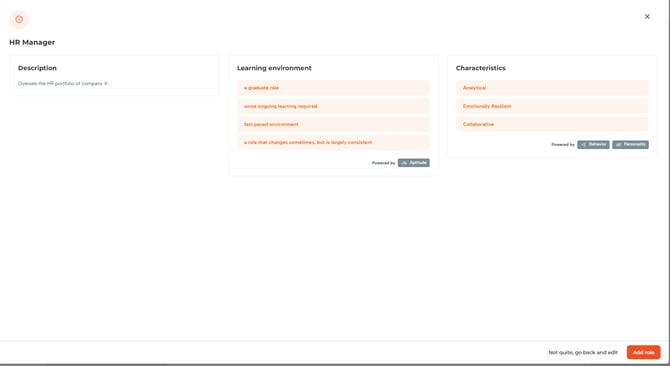
Review your role and once you are satisfied, you can click "Add role". Next, you will be able to add already existing candidates or invite new candidates to your role.
Adding candidates to a job role

Any admin can add new or existing candidates to a job role. They will then appear in the list of candidates and be automatically compared to each other.

You can add new candidates by entering their email addresses in the pop-up.

A screenshot of a computer

Description automatically generated, Picture

Choose the assessments you want them to complete.

Picture 1, Picture

They can be reminded to complete the assessments or removed from the process at any point by selecting the ellipsis on the right-hand side of each row.

Picture 2, Picture